# Cenvero Fleet — every server you run, one binary away
> Markdown version of . The complete reference in one file is at .
Cenvero Fleet is a free, open-source, self-hosted server fleet manager: shells, fan-out commands, secure file transfer, live sync, services, logs, metrics and alerts across Linux, macOS and Windows servers — over encrypted, host-key-pinned SSH. No cloud account, no hosted control plane. Built for humans and AI agents alike.
[Install Fleet](https://fleet.cenvero.org/#install) · [Read the docs](https://fleet.cenvero.org/docs/)
- Free & open source (AGPL)
- Works behind NAT
- Signed releases
*Example — Terminal: running a command across the web servers, uploading a release and listing servers with Cenvero Fleet*
```console
$ fleet exec --group role=web -- systemctl is-active nginx
=== web-01 [exit 0] ===
active
=== web-02 [exit 0] ===
active
$ fleet file upload web-01 ./site.tar.gz /srv/releases/
uploaded /srv/releases/site.tar.gz (48.2 MiB)
$ fleet server list
NAME MODE STATUS OS/ARCH TAGS
db-01 direct online linux/amd64 role=db
edge-01 reverse online linux/arm64 role=edge
web-01 direct online linux/amd64 role=web
web-02 direct online linux/amd64 role=web
```
## Up and running in a minute.
The controller is a single signed binary with no runtime dependencies. Install it on the machine you manage your servers from — your laptop, a bastion host or a small VM.
- Release archives are **minisign-verified** before anything is installed.
- Upgrade any time with `fleet update apply` (or `brew upgrade cenvero-fleet`).
- Build from source with Go: `git clone https://github.com/cenvero/fleet && make build`.
**macOS**
Homebrew (recommended):
```sh
brew tap cenvero/fleet && brew install cenvero-fleet
```
or the install script:
```sh
curl -fsSL https://fleet.cenvero.org/install | sh
```
**Linux**
Install script:
```sh
curl -fsSL https://fleet.cenvero.org/install | sh
```
Detects your CPU architecture, verifies the signature and installs `fleet`. Homebrew on Linux works too.
**Windows**
Windows Package Manager:
```powershell
winget install --id Cenvero.Fleet --exact --source winget
```
or PowerShell:
```powershell
irm https://fleet.cenvero.org/install.ps1 | iex
```
WinGet owns upgrades and removal of its install. The PowerShell script runs in PowerShell 5.1 or later — no administrator rights needed — installs `fleet.exe` to `%USERPROFILE%\.local\bin` and adds it to your user `PATH`.
- **0** cloud accounts or hosted services
- **2** transport modes — direct & reverse
- **3** ways to work — CLI, terminal UI, web UI
- **AGPL** open source, self-hosted, yours
## Everything you need to run a fleet.
One controller replaces a drawer of scripts, SSH configs and dashboards — and every action is scriptable, auditable and available as JSON.
### Shells and fan-out commands
Open a persistent shell that survives network drops, or run a command on one server, a tag group or the whole fleet at once — with ordered output, timeouts, per-server exit codes and `--json` for scripts.
```sh
fleet exec --group role=web --json -- uptime
```
### File transfer that doesn't flinch
Chunked, parallel, SHA-256-checksummed and resumable uploads and downloads, server-to-server copies, and `fleet sync` to keep a local folder mirrored to a server — live.
```sh
fleet sync web-01 ./site /srv/www
```
### Direct or reverse
Reach servers directly, or let agents dial out from behind NAT and firewalls. Mix both in one fleet.
### Agent auto-install
Add a server and Fleet installs, verifies and starts its agent over SSH — with a preview before anything changes.
### Services, logs & journald
Start, stop and restart units, follow and search logs, query the journal, and keep a cached copy for offline reading.
### Metrics, alerts & notifications
CPU, memory, disk and load history, threshold alerts, and Slack or webhook notifications when servers go offline or jobs fail.
### Jobs, cron & drift
Run long tasks as detached jobs, manage crontabs, and detect config files that drift from a captured baseline.
### Built for AI agents
A self-describing CLI that Claude Code or Codex learns in one command — then operates your fleet safely.
[Agentic Fleet](https://fleet.cenvero.org/agentic.html)
## Terminal, browser or script — your call.
The same engine drives a live terminal dashboard, a dual-pane terminal file manager, a localhost web UI and a CLI that prints JSON.
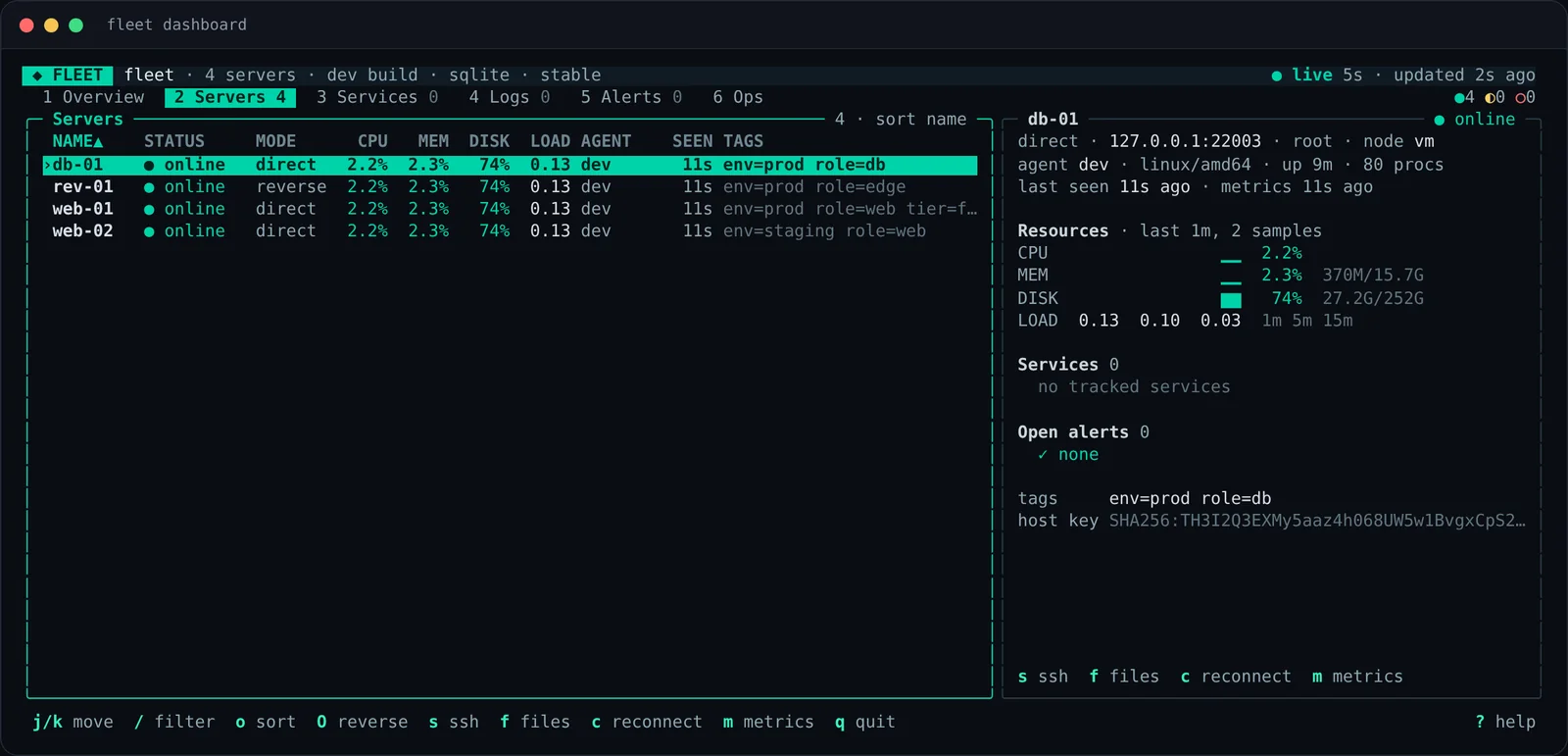
**`fleet dashboard`** — a live operations console: servers, services, logs, alerts and the audit trail, with keyboard and mouse. (New in v2.5.0)
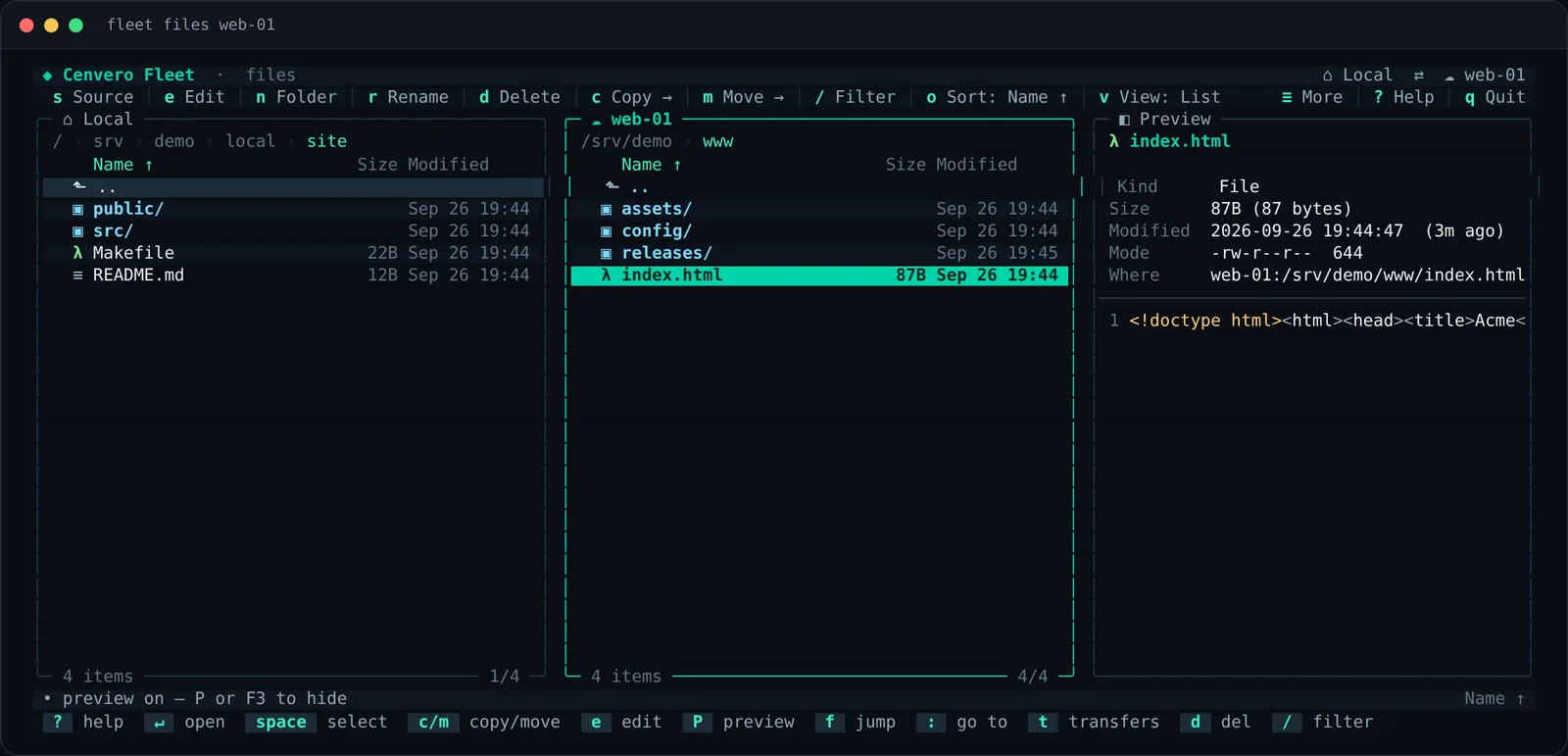
**`fleet files`** — a dual-pane file manager for local ↔ server and server ↔ server work, with previews, a transfer queue and drag and drop. (New in v2.5.0)
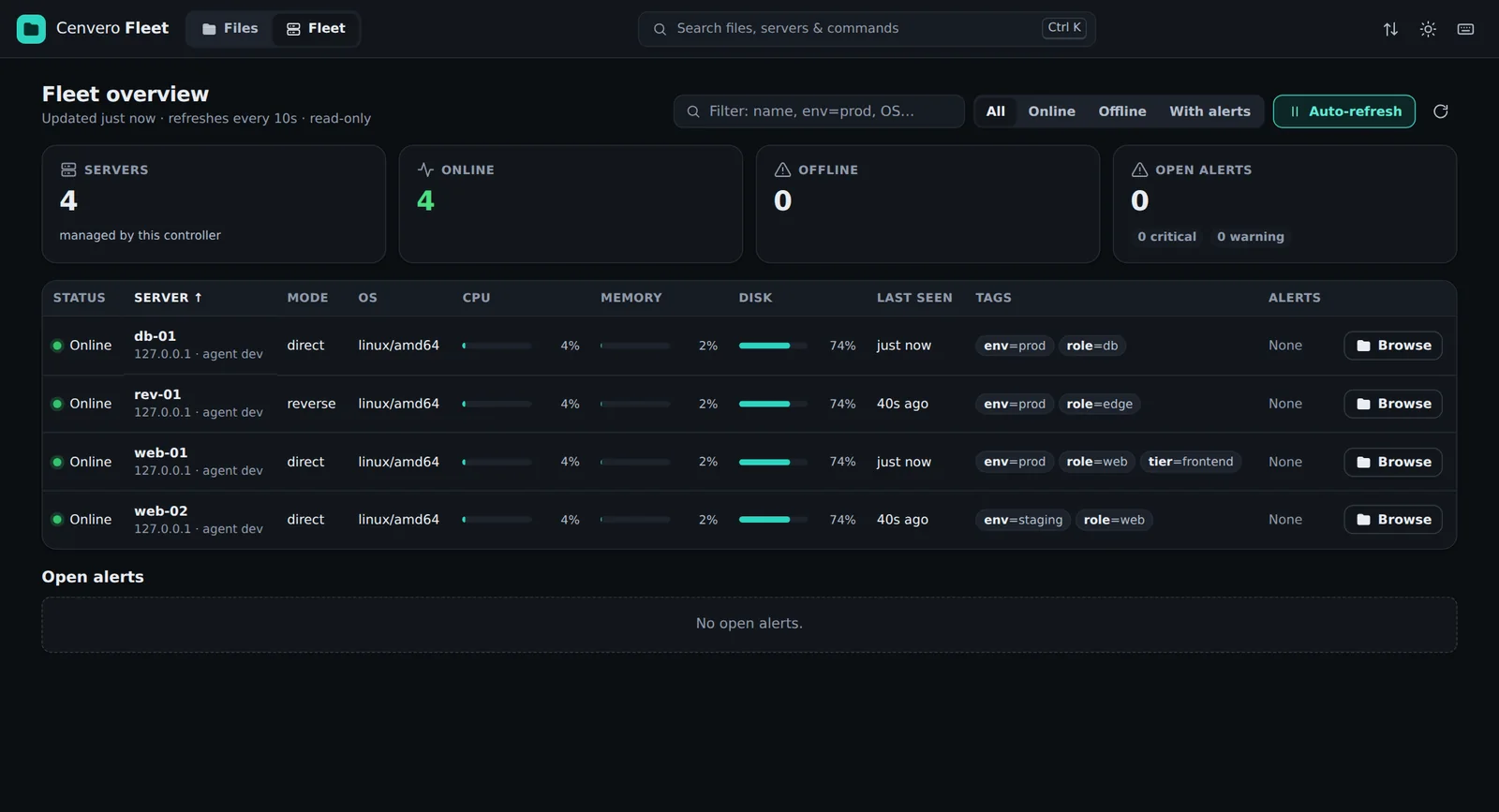
**`fleet file ui`** — a localhost-only web UI with a drag-and-drop file manager and a read-only Fleet overview. (New in v2.5.0)
## Reach every server — even the ones behind NAT.
In **direct mode** the controller connects to the agent over SSH when it needs to. In **reverse mode** the agent dials out and keeps an authenticated session open, so the server needs no inbound port at all. Mix both in the same fleet.
- Ed25519 keys and **trust-on-first-use host-key pinning** in both directions.
- Reverse agents enrol with a **one-time token** and the controller's fingerprint.
- Pooled connections with keepalives; agents reconnect on their own after a drop.
*Diagram — Direct and reverse transport modes: In direct mode the controller connects to the agent's SSH port. In reverse mode the agent connects out through a firewall to the controller, which reaches it over that session.*
## Let an AI agent run the fleet — with guard rails.
One command teaches Claude Code or Codex the entire CLI. The agent reads `fleet context`, then deploys, debugs and verifies across your servers with your keys, on your machine — and every command returns JSON it can reason about.
- **Scoped, fail-closed tokens** limit which servers, commands and secrets an agent can touch.
- **Dry runs, approvals and idempotency keys** keep unattended runs predictable.
- **`fleet guard`** reverts a risky change automatically unless it is confirmed.
[Explore Agentic Fleet](https://fleet.cenvero.org/agentic.html)
*Example — Terminal: installing the Fleet skill for Claude Code and asking the agent to restart nginx and show logs*
```console
$ fleet skill claude
✓ /fleet installed — restart Claude, type /fleet
› /fleet restart nginx on the web tier and
show me the last 20 error lines
● fleet context learned 60+ commands
● fleet exec --group role=web --json -- \
systemctl restart nginx
web-01 exit 0 · web-02 exit 0
● fleet journal web-01 --unit nginx.service --grep error
no errors since restart
Both web servers restarted cleanly; no new errors.
```
## Secure by default, auditable by design.
Fleet runs with root-level reach across your infrastructure, so it is built to be boringly safe.
### Pinned, encrypted channels
Ed25519 keys, trust-on-first-use host-key pinning, and one-time enrolment tokens for reverse agents. Key rotation verifies the new key before retiring the old one.
### Signed, anti-rollback updates
Every release is minisign-signed. The installer and updater verify it and refuse downgrades; agent rollouts can be canaried.
### Scoped tokens & secrets
Fail-closed RBAC tokens per server, group and command; named secrets that reach commands through the environment and are redacted from output.
### Approvals & command policy
Stage risky commands for a human to review, deny or require confirmation for patterns, and dry-run anything first.
### Tamper-evident audit log
A hash-chained log of transfers and key changes and, since v2.5.0, every remote command, approval, and token or secret change. Never the secret values.
### Locked-down surfaces
The web UI binds to loopback with a per-run token, CSRF checks and a strict CSP; agents can be confined to allow-listed directories.
## From install to your first fan-out in four steps.
1. **Initialise the controller**
Creates the config directory, Ed25519 keys and databases.
```sh
fleet init
```
2. **Add a server**
Interactive by default; Fleet installs the agent over SSH.
```sh
fleet server add web-01 192.0.2.10 --login-user root
```
3. **Tag and group**
Label servers once, then target them by expression.
```sh
fleet tag web-01 role=web env=prod
```
4. **Operate**
Shell in, fan out, or open the dashboard.
```sh
fleet exec --group role=web -- uptime
fleet dashboard
```
## Questions, answered.
### Is Cenvero Fleet free?
Yes. Cenvero Fleet is free and open source under the AGPL-3.0-or-later license. There is no paid tier, no account and no hosted service.
### Do I need a cloud account or a hosted control plane?
No. The controller is a binary on your own machine. It talks to your servers over encrypted, host-key-pinned SSH channels and keeps its state in a local directory — SQLite by default, or PostgreSQL, MySQL or MariaDB if you prefer.
### Can it manage servers behind NAT or a firewall?
Yes. In reverse mode the agent dials out to the controller and keeps an authenticated session open, so the server needs no inbound port. Direct and reverse servers can be mixed in one fleet.
### Which operating systems are supported?
The controller runs on Linux, macOS and Windows. Agents are installed automatically on Linux servers with systemd; macOS and Windows agents can be set up manually. Service and firewall management are Linux features.
### How is Cenvero Fleet different from Ansible?
Ansible applies playbooks. Fleet is an interactive, always-connected control plane: live shells, fan-out commands with JSON output, file transfer and live sync, logs, metrics, alerts, a terminal dashboard and a web UI — plus a CLI that AI agents can discover and drive. Many teams use both.
### Can an AI agent operate my servers with Fleet?
Yes. Run `fleet skill claude` (or `codex`). The agent learns the whole CLI from `fleet context` and operates your fleet with your keys, on your machine — with scoped tokens, approvals, dry runs and a dead-man's switch as guard rails. [Read more about Agentic Fleet](https://fleet.cenvero.org/agentic.html).
### How are releases and updates verified?
Every release is signed with minisign. The installer and the updater verify the signature, and refuse to roll back to an older version, before anything is replaced.
## Take back control of your fleet.
Install the controller, add a server and run your first command across the fleet — all in a few minutes.
[Install Fleet](https://fleet.cenvero.org/#install) · [View on GitHub](https://github.com/cenvero/fleet)